
Google Analytics is the default choice for most websites. It’s free, well-documented, and it’s what everyone else seems to use. But “default” and “best fit” are not the same thing.
A lot of site owners install GA4, struggle with the interface, and eventually stop checking it because getting a simple answer takes too long. Others run into the privacy side of things – consent banners, data going to Google, cookie configuration – and start asking whether there’s a cleaner way to do this.
This comparison breaks down what Google Analytics and SimpleStats actually do differently, where each one genuinely wins, and which one makes more sense depending on what you’re trying to accomplish.
In This Article:
What Is Google Analytics?
Google Analytics is a free analytics platform from Google. GA4 is the current version, launched in 2023 to replace Universal Analytics. It tracks pageviews, sessions, user behavior, conversions, and audience data across websites and apps.
It’s the most widely used analytics tool in the world, and it integrates directly with Google Ads, Google Search Console, and BigQuery. For businesses running Google Ads campaigns, that integration is difficult to replace.
What Is SimpleStats?
SimpleStats is a privacy-first analytics platform that tracks your traffic, shows what visitors do on your site, and includes heatmaps and session replays – all in one place. Lightweight tracking runs without cookies or personal data collection, so no consent banner is needed. Either way, your data never goes to Google or any third party.
Unlike Google Analytics, SimpleStats bundles heatmaps and session replays alongside standard analytics – so you’re not paying for two separate tools. It works on any website: WordPress, Shopify, or custom-built. Plans start free and go up to $99/month for agencies.
Setup and Getting Started
Google Analytics
Setting up GA4 properly takes time. You need a Google account, a GA4 property, a data stream, and a tracking method – either direct code installation or Google Tag Manager. Configuring events, goals, and eCommerce tracking adds more steps on top.
For a basic setup you’re looking at 20-60 minutes. A proper eCommerce or event-tracking setup takes longer and usually requires developer help.
SimpleStats
SimpleStats takes under two minutes to set up. WordPress users install the plugin with one click. Everyone else pastes a single line of code. No Google account, no property configuration, no tag manager.
Data starts appearing immediately. You don’t need to configure anything to see your traffic, top pages, referrers, countries, and devices.
Key Takeaway: SimpleStats wins on setup – data in under 2 minutes, no Google account or developer needed.
Analytics Dashboard and Reports
Google Analytics
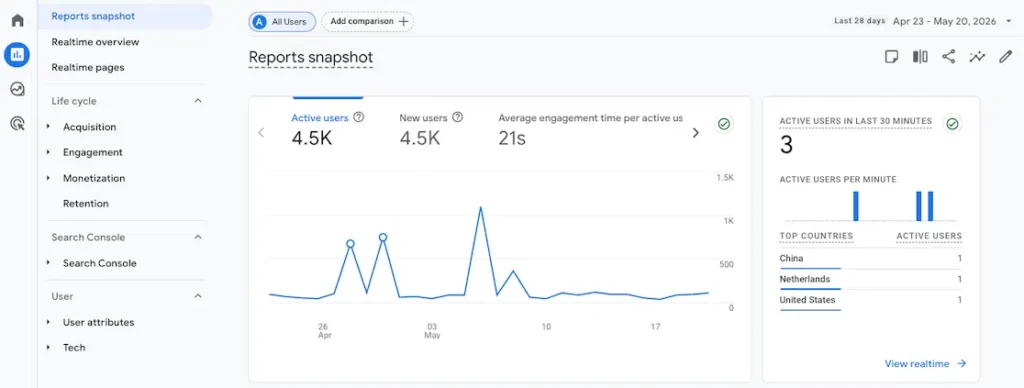
GA4 has a lot of reports. Traffic, engagement, monetization, retention, demographics – plus the Explore tool for building custom reports. It’s powerful, but finding the three numbers you actually care about takes longer than it should.
For teams with a dedicated analyst or someone who’s spent time learning the interface, GA4’s depth is genuinely valuable. For everyone else, it often becomes a tool people check less and less.
SimpleStats
SimpleStats puts everything on one screen. Pageviews, sessions, top pages, referrers, countries, devices, and UTM tracking – all visible the moment you log in. No menus, no configuration, no training required.
You can filter by date range, device, country, referrer, or campaign source. Export as PDF or CSV. Get weekly or monthly email summaries sent to your inbox automatically.
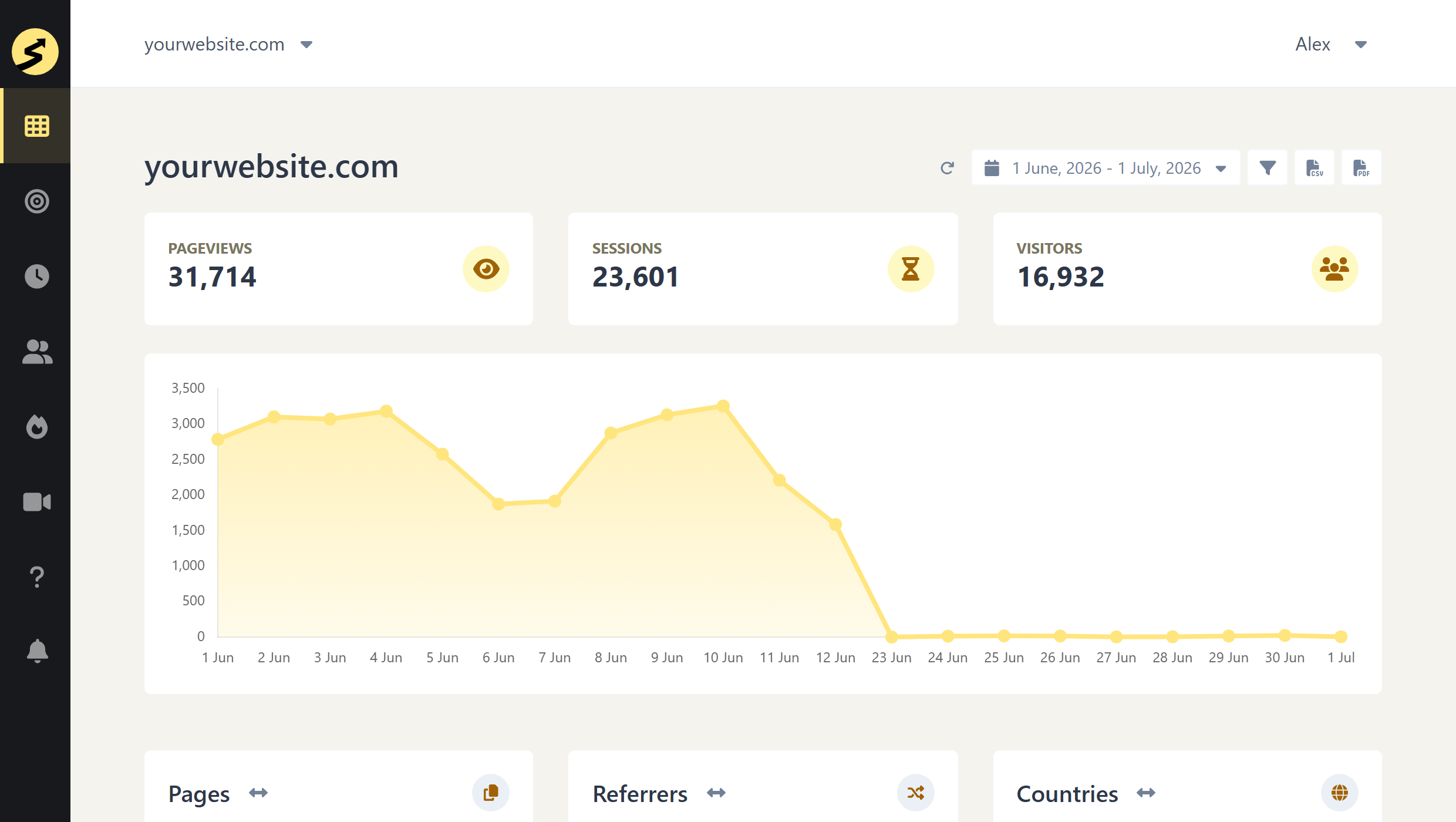
Key Takeaway: GA4 has more depth; SimpleStats gives faster answers. For most site owners, SimpleStats wins on day-to-day usability.
Privacy and Cookie Compliance
Google Analytics
GA4 uses cookies and collects personal identifiers. That means a consent banner is required in most countries – the EU, the UK, and anywhere else with cookie regulations. Your visitor data is processed by Google and used within their ecosystem.
Running GA4 compliantly requires a consent management platform, regular privacy policy updates, and ongoing maintenance as regulations change. It’s not a one-time setup.
SimpleStats
SimpleStats’ Lightweight tracking uses no cookies and collects no personal data – so there’s nothing to consent to. Advanced features like heatmaps and session replays use cookies alongside localStorage to identify visitors – but your data stays on SimpleStats’ servers and is never shared with Google or any third party.
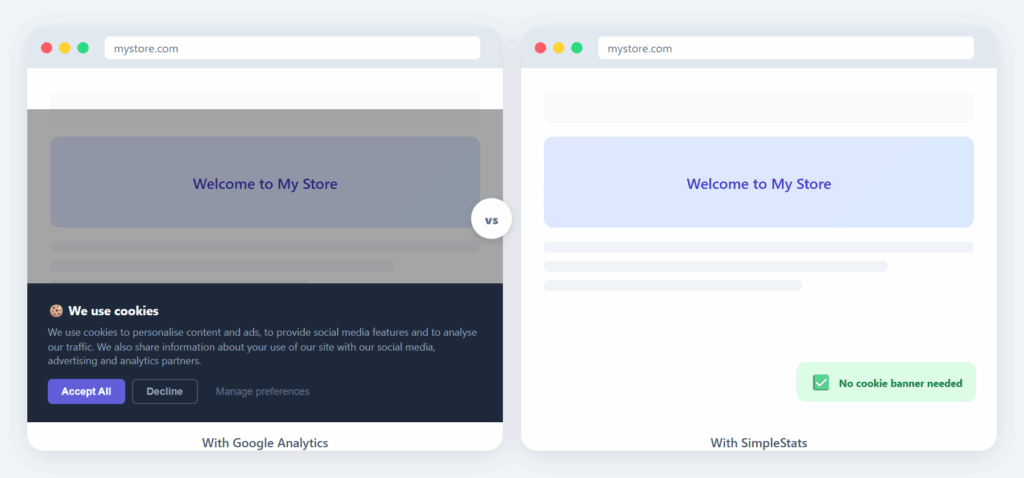
Key Takeaway: SimpleStats wins on privacy – Lightweight tracking needs no cookie banner, and either way your data stays on SimpleStats’ servers and never goes to Google.
Real-Time Data
Google Analytics
GA4 has a Realtime report showing active users in the last 30 minutes. Standard reports, however, process with a delay – typically up to 24-48 hours before data is fully reflected. If you publish something and want to know how it’s performing, you’re waiting.
SimpleStats
SimpleStats data updates the moment it happens – no 24-48 hour lag like GA4. It also includes a dedicated real-time dashboard showing active visitors, pages, countries, and devices right now.
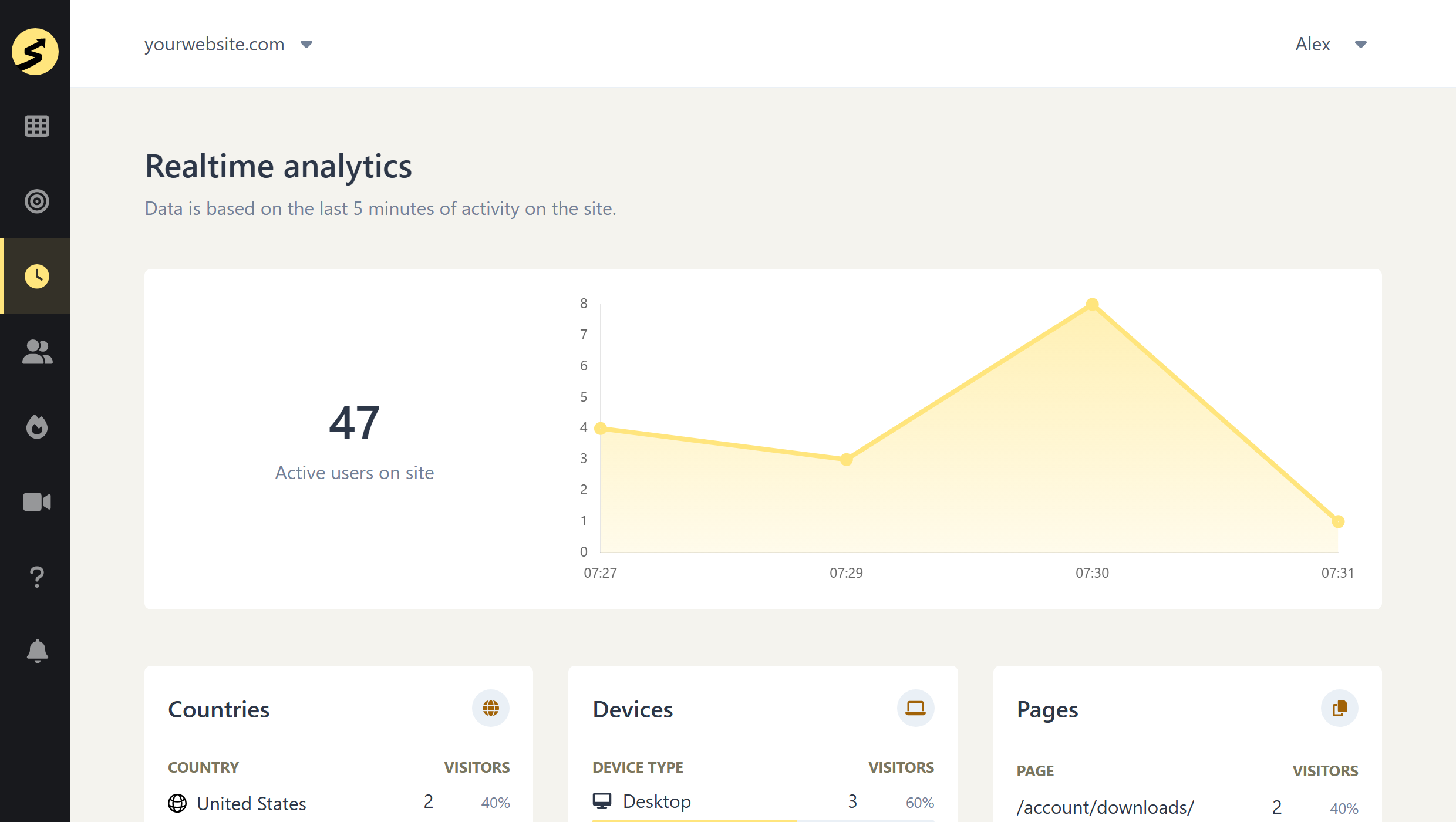
Key Takeaway: SimpleStats wins on both counts – all data is live with zero delays (no 24-48h wait like GA4), and the realtime dashboard is part of the main interface, not buried behind a separate menu.
Heatmaps and Session Replays
Google Analytics
GA4 does not include heatmaps or session replays. If you want to see where visitors click, how far they scroll, or watch recordings of real visits, you need a separate tool – Hotjar, Microsoft Clarity, or similar. That means a second subscription, a second tracking script, and usually a second consent banner.
SimpleStats
Heatmaps and session replays are included from the Pro plan at $19/month. You see exactly where visitors click and scroll on any page, and you can watch recordings of individual visits to understand what they actually did.
No second tool, no extra subscription. Everything is in the same dashboard as your traffic data.
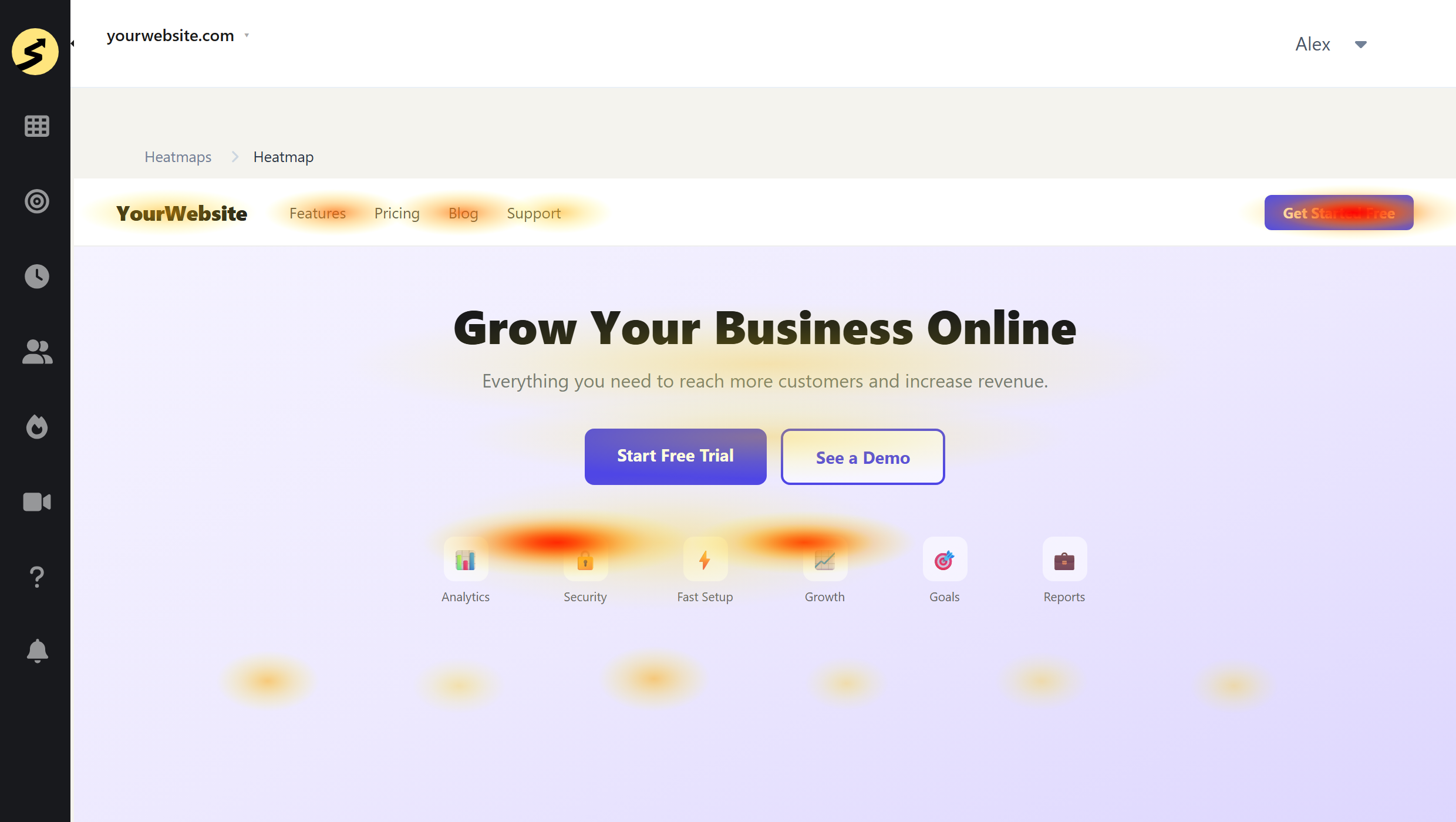
Key Takeaway: SimpleStats wins – heatmaps and session replays are built in. GA4 requires a separate tool and a separate subscription.
eCommerce Tracking
Google Analytics
GA4’s eCommerce tracking is powerful and free – but setting it up requires developer work. You need to push data layer events for purchases, product views, and cart activity. For most non-technical users, this means hiring someone or using a plugin that does it for you.
SimpleStats
SimpleStats covers eCommerce tracking with a simpler setup than GA4 – tracking add to carts, purchases, revenue, and more. A dedicated eCommerce report is on the way. You can also track purchases as Goals alongside your standard traffic data right now.
Key Takeaway: Tie with a lean to SimpleStats for simplicity. GA4 wins for enterprise eCommerce tied to Google Ads campaigns.
Pricing
Google Analytics
GA4 is free at any scale. That’s a genuine advantage, especially for high-traffic sites. The trade-off is that your data is processed by Google and used within their ecosystem.
Running GA4 compliantly adds hidden costs: a consent management platform ($10-50+/month), developer time for setup and maintenance, and ongoing legal review as regulations change.
SimpleStats
SimpleStats starts free at 500 pageviews/month. Paid plans start at $10/month (Hobby, 10K pageviews) and $19/month (Pro, 25K pageviews, heatmaps, and session replays). Agency plans go up to $99/month for 25 sites and 1 million pageviews.
There’s no developer required for setup, and with Lightweight tracking there’s no consent management platform to pay for either. For small to mid-size sites, the all-in cost is often lower than GA4 done properly. See the full SimpleStats pricing breakdown.
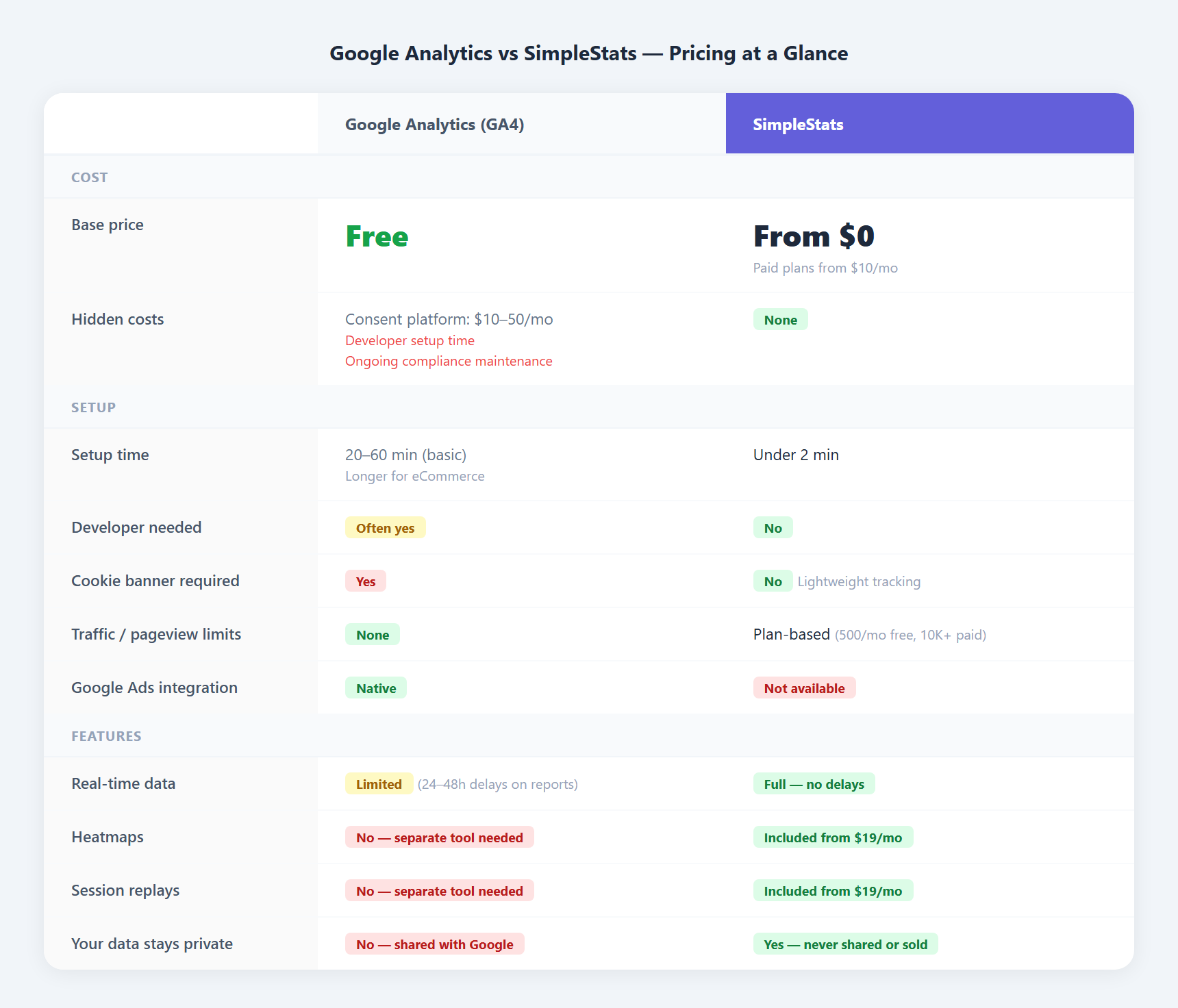
Key Takeaway: GA4 wins on headline price. SimpleStats wins on total cost when compliance tools and developer time are factored in.
See Why Site Owners Choose SimpleStats
Privacy-first analytics with heatmaps, session replays, and eCommerce tracking – from $10/month.
Get SimpleStats Now →Google Analytics vs SimpleStats: Which Should You Choose?
Choose Google Analytics if…
- You run Google Ads and need attribution data tied to your campaigns
- You need BigQuery integration or advanced audience modeling
- You have a developer or analyst to set it up and maintain it
- Traffic volume is very high and cost is the primary factor
Choose SimpleStats if…
- You want analytics without a cookie banner on your site
- You want a clean dashboard where key stats and live visitor data are always one click away
- You want heatmaps and session replays without a second subscription
- You want your data private – not processed by Google
- You want to be set up in 2 minutes, not 2 hours
- You manage multiple sites and want them all in one dashboard
Frequently Asked Questions
Is SimpleStats free?
Yes – there’s a free plan with 500 pageviews per month, useful for new or low-traffic sites. Paid plans start at $10/month for 10,000 pageviews.
Does SimpleStats replace Google Analytics completely?
For most site owners, yes. If you rely on Google Ads attribution or need BigQuery integration for advanced data modeling, GA4 may still be necessary for those specific use cases. Many site owners run SimpleStats as their primary dashboard and keep GA4 only for Google Ads.
Do I need a cookie banner with SimpleStats?
For Lightweight tracking, no – SimpleStats tracks visitors without cookies or personal data, so no consent notice is needed. If you enable heatmaps or session replays, those features use cookies and require a consent setup. Either way, your data never goes to Google or third parties.
Can I use both Google Analytics and SimpleStats?
Yes. Some site owners use SimpleStats as their main day-to-day dashboard and keep GA4 running in the background for Google Ads attribution. Both scripts can run on the same site.
Does SimpleStats work on non-WordPress sites?
Yes. SimpleStats works on any website – WordPress, Shopify, Squarespace, or custom-built. Add one line of code and it’s running.
Get SimpleStats Now
Start free or unlock everything from $10/month. 100% no-risk money-back guarantee.
Get SimpleStats Now →Google Analytics is a powerful tool built for teams with the resources to use it properly. If that’s not your situation – if you want clear answers, your data off Google, and behavior analytics all in one clean dashboard – SimpleStats is built for that.