
Matomo has been around since 2007 and earned a real reputation as the privacy-focused alternative to Google Analytics. If you’ve been researching analytics tools, you’ve almost certainly come across it. The free self-hosted version and long feature list make it genuinely appealing.
But “feature-complete” and “right for you” aren’t the same thing. Matomo is powerful – and that power comes with real complexity. Getting it running the way you want takes effort, the interface can be overwhelming, and the heatmaps and session recordings that stood out on the features page? Those aren’t included in the free WP plugin – you’ll need a paid plan or a paid add-on to get them.
SimpleStats takes the opposite approach: traffic analytics, heatmaps, eCommerce tracking – all bundled in, no add-ons, no server. This comparison breaks down exactly where each tool wins, where it falls short, and which one fits your situation.
In This Article:
What Is Matomo?
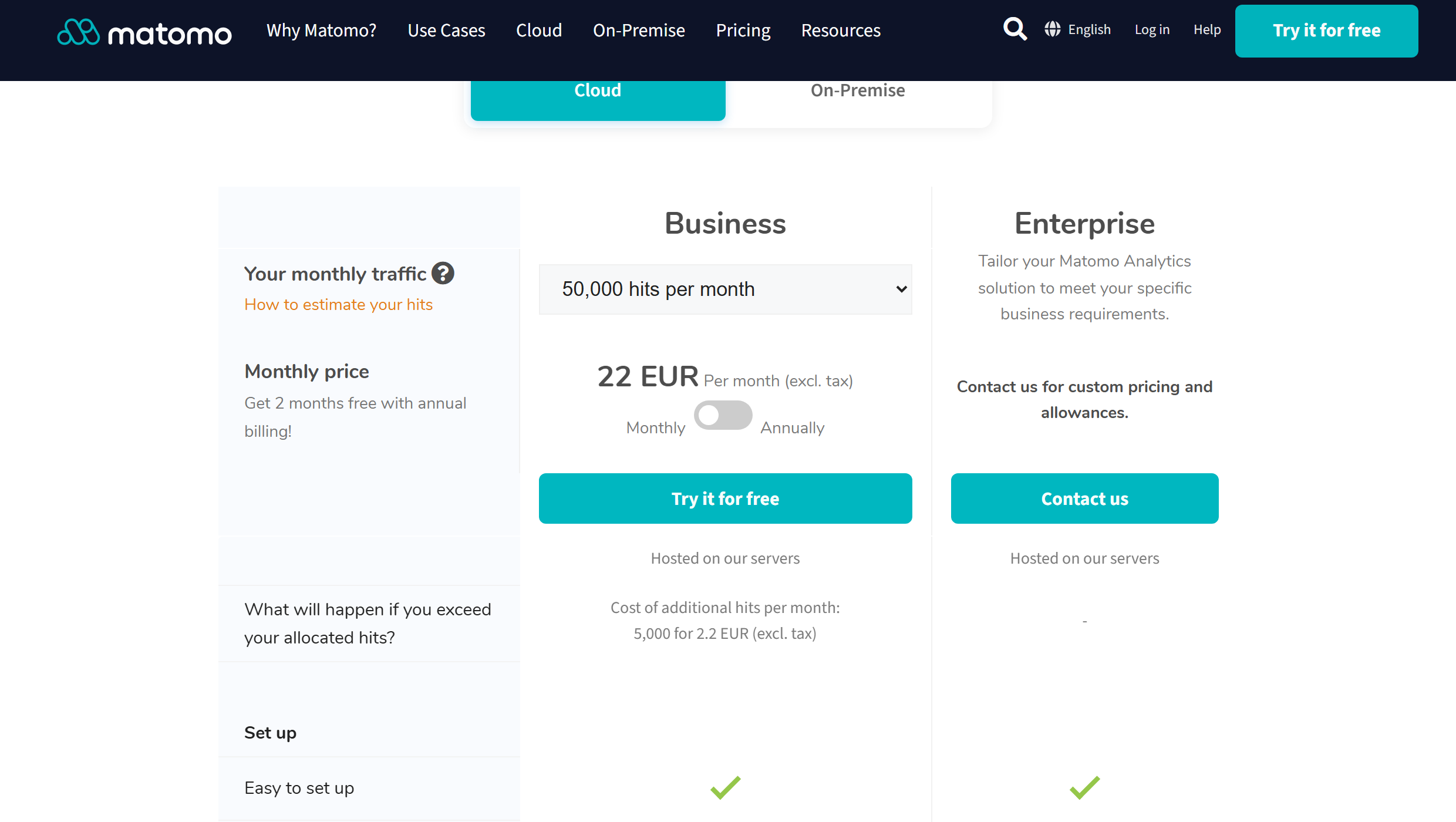
Matomo (formerly Piwik) is an open-source analytics platform that’s been available since 2007. For WordPress users, the most relevant option is the free Matomo for WordPress plugin – install it from the plugin directory, no separate server needed. Your data stays in your WordPress database, and you own it entirely. There’s also Matomo Cloud from €22/month, where Matomo handles the hosting.
The feature list is long: web analytics, heatmaps, session recordings, funnel analysis, and more. Most of those extras – especially heatmaps and session recordings – require a paid plan. They’re not included in the free WP plugin; Matomo Cloud starts from €22/month and includes them.
What Is SimpleStats?
SimpleStats is a privacy-first analytics platform that combines traffic analytics, heatmaps, session replays, and eCommerce tracking in one dashboard – all bundled in, no add-ons needed. Install it with a one-click WordPress plugin or paste one line of code on any other platform. Lightweight tracking sets no cookies and needs no consent banner – your data stays on SimpleStats servers and is never sold, shared, or used for advertising.
The idea is straightforward: give WordPress site owners the kind of analytics that used to require multiple expensive tools – without a developer, without a server, and without a learning curve.
Related Reading
Setup and Installation
Matomo
The Matomo for WordPress plugin installs like any other plugin – search for it in the plugin directory, activate it, and it starts collecting data. No separate server, no FTP, no database setup. Getting tracking running is fast.
The tradeoff is where your data goes. Matomo writes all analytics data directly into your WordPress database. On a site with real traffic, this adds up fast – analytics tables can grow to hundreds of megabytes, slowing down backups, migrations, and database queries over time. If you want Matomo without the database impact, Matomo Cloud (€22/month) hosts the data on their servers instead – but that removes the free tier.
SimpleStats
Install the WordPress plugin from the plugin directory, activate it, and connect your account. That’s it. For non-WordPress sites, paste one line of code into your site’s header. Either way, live data shows up in your dashboard within minutes of connecting.
There’s no server to configure, no database to set up, and no technical background required. The entire onboarding is designed to get you from “I need analytics” to “I have analytics” as fast as possible.
Key Takeaway: SimpleStats wins here. The Matomo WP plugin is easy to install, but it stores all analytics data in your WordPress database – significant bloat on any site with real traffic. SimpleStats stores data server-side, so your database stays clean no matter how much traffic you get.
Analytics Dashboard and Reporting
Matomo
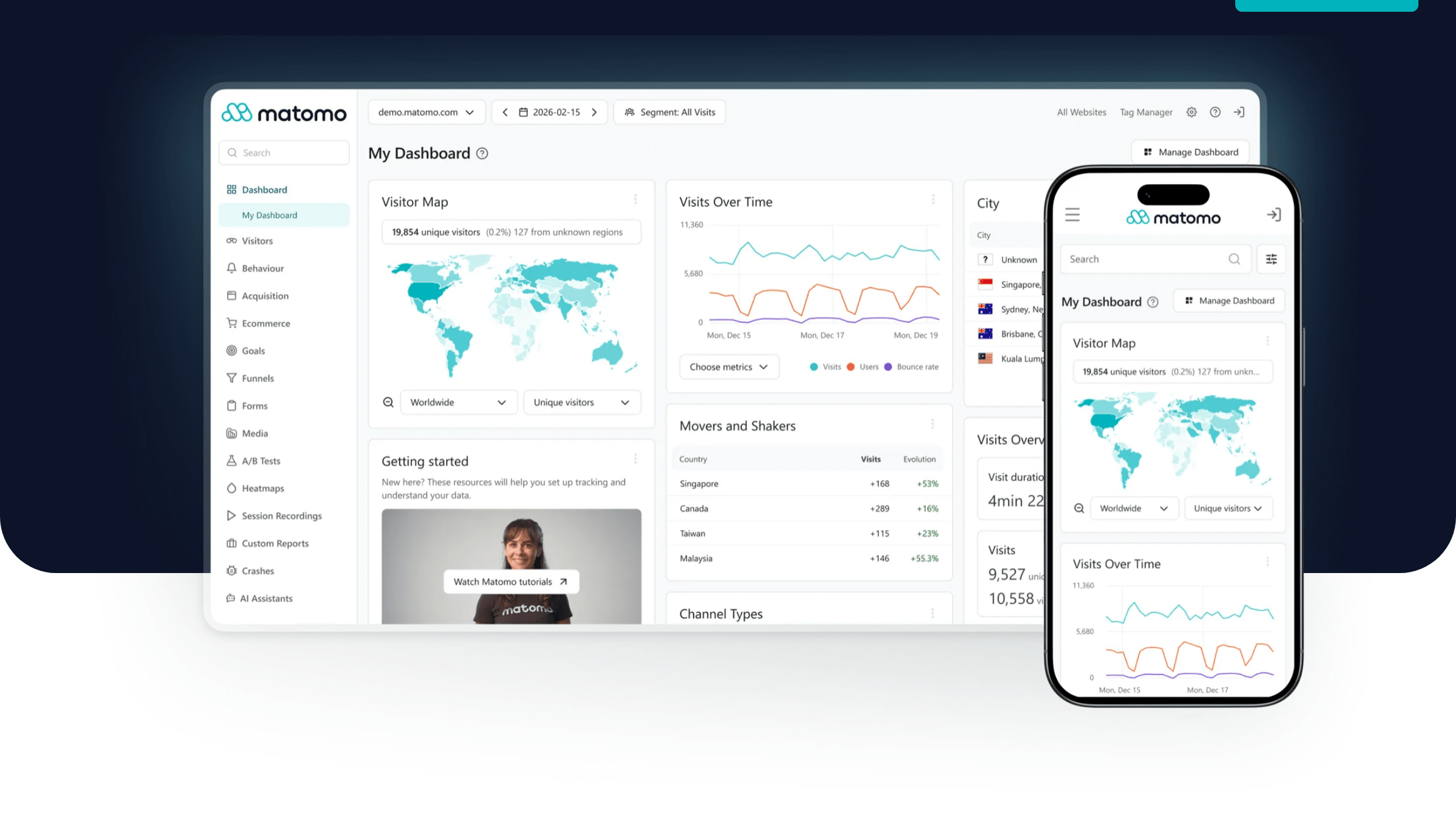
The free Matomo WordPress plugin covers the essentials: visits, page performance, referrers, goals, and eCommerce tracking. The platform also supports funnels, A/B testing, cohort analysis, and roll-up reporting – but these are all paid add-ons from the Matomo marketplace, not included in the free plugin. If your team needs that depth and is willing to pay for individual modules, the capability is there.
The tradeoff is the interface. Matomo’s UI has a well-earned reputation for being dense and difficult to navigate. Finding what you need requires learning the platform, and many of the advanced reports feel like they were built for data analysts rather than site owners.
SimpleStats
SimpleStats shows you traffic, top pages, referrers, countries, devices, goals, and campaign data in one clean dashboard. Real-time data updates instantly – no 24-hour delays. You can filter by any combination of source, page, device, and more with a few clicks.
What SimpleStats doesn’t have yet: funnel analysis, A/B testing, or cohort/retention reports. If you need those, Matomo has a real edge. For most WordPress site owners – who want to know where their traffic comes from, what people read, and whether their goals are converting – SimpleStats covers everything that actually gets used.
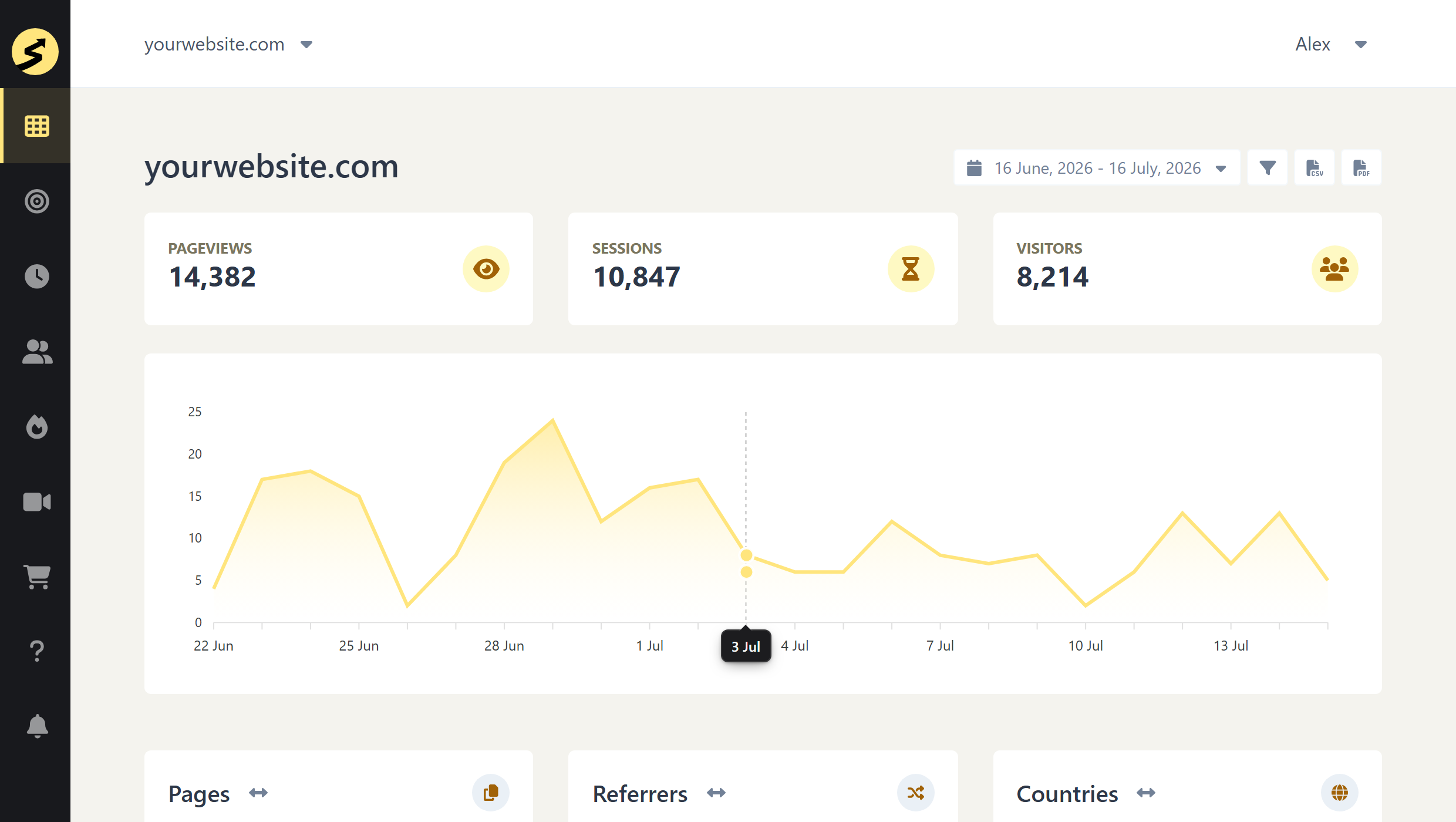
Key Takeaway: Matomo’s free plugin covers traffic basics well, but advanced features like funnels, A/B testing, and cohort analysis are all paid marketplace add-ons. SimpleStats gives you clean, fast insights without the add-ons or the learning curve.
Privacy and Compliance
Matomo
Matomo doesn’t sell your data or use it for advertising – that’s the shared foundation it has with SimpleStats, and the main reason both tools exist as alternatives to Google Analytics. On top of that, self-hosted Matomo keeps your data entirely on your own infrastructure: no third party has access to it. For organizations with strict data residency requirements – healthcare, legal, finance – that’s a genuine differentiator that no SaaS tool can match.
Matomo can also be configured to run without cookies, removing the consent banner requirement. This isn’t the default – you’ll need to enable it manually in the privacy settings – but once done, it’s GDPR compliant and requires no ongoing maintenance.
SimpleStats
Like Matomo, SimpleStats never sells, shares, or uses your data for advertising. Beyond that, SimpleStats’ Lightweight tracking sets no cookies by architecture – nothing to configure, no consent banner, GDPR and CCPA compliant automatically.
The one thing SimpleStats can’t offer: full data sovereignty. Your data lives on SimpleStats’ servers, not your own. If having analytics data only ever on your own infrastructure is a hard requirement, self-hosted Matomo is the only option that delivers it.
Key Takeaway: Both tools refuse to sell or monetize your data – that’s their shared foundation over Google Analytics. SimpleStats wins for compliance without effort: Lightweight tracking needs no consent banner and no configuration. Self-hosted Matomo wins for data sovereignty: your data never leaves your own server.
Heatmaps and Session Replays
Matomo
Heatmaps and session recordings are not included in the free Matomo WP plugin – they require a paid marketplace add-on. On Matomo Cloud, the Business plan (from €22/month) does include them: 1,500 heatmap pageviews and 150 session recordings per month. On self-hosted Matomo, the Heatmap & Session Recording plugin is available from the Matomo marketplace at an additional cost.
Once set up, Matomo’s heatmaps work well. But the free WP plugin has no behavioral analytics at all – you’d need to either upgrade to Matomo Cloud or purchase the marketplace add-on for the WP plugin.
SimpleStats
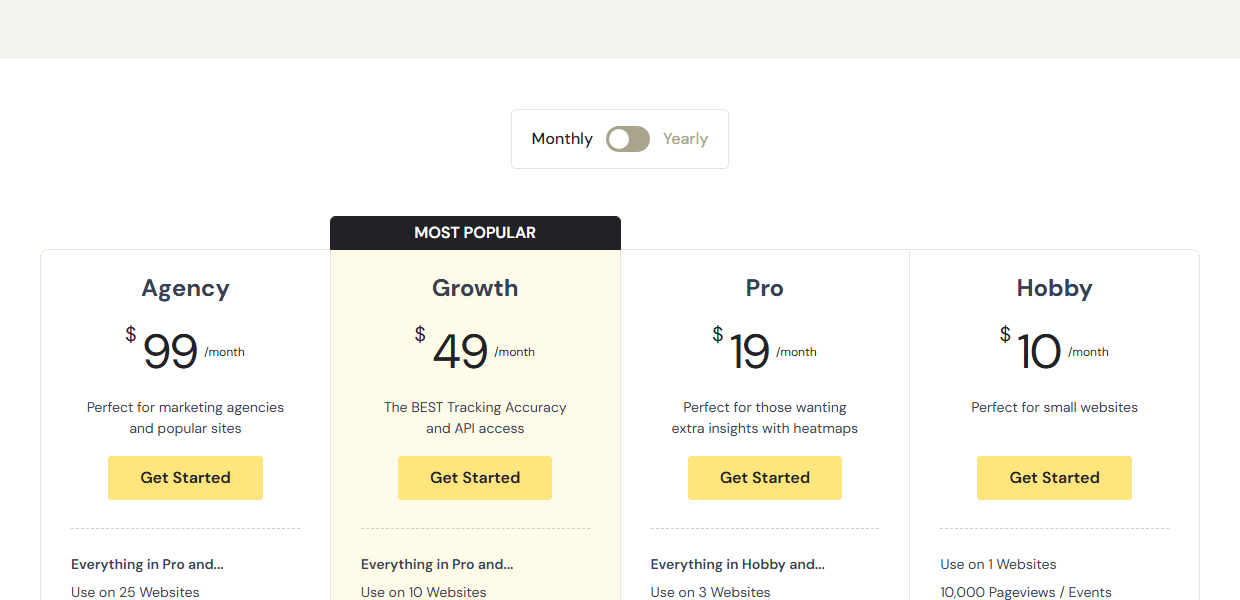
Heatmaps and session replays are included in SimpleStats Pro ($19/mo) – no add-on, no separate purchase, no extra configuration. You get click heatmaps across your pages and session recordings of real visitor interactions, all from the same dashboard.
Session replays start at 1,000 recordings per month on Pro – over 6x more than the 150 included in Matomo Cloud – with higher limits on Growth and Agency plans. The recordings exclude personal data and keystrokes by design – you see where visitors go and what they click, not who they are.
Key Takeaway: The free Matomo WP plugin has no heatmaps or session recordings. Matomo Cloud (€22/month) includes them – but just 150 recordings/month. SimpleStats Pro is $19/month with 1,000 session replays. More volume, lower price.
Related Reading
See Why Site Owners Choose SimpleStats
Privacy-first analytics with heatmaps and session replays from $19/month. eCommerce tracking from $10/month. No add-ons, no server to manage.
Try SimpleStats Free →eCommerce Tracking
Matomo
Matomo has solid eCommerce tracking built into the free plugin – order reporting, revenue data, and product tracking are all included at no extra cost. Funnel analysis is a paid add-on from the Matomo marketplace. For WooCommerce stores willing to pay for that add-on, the depth of data is genuinely strong.
SimpleStats
eCommerce tracking is available on the Hobby plan ($10/month) and above – it’s not included on the free plan. From Hobby, SimpleStats tracks transactions, revenue, and average order value on any eCommerce platform. Full revenue attribution – connecting sales to traffic sources and campaigns – is available on Advanced tracking mode. Native WooCommerce and Easy Digital Downloads integrations are coming soon.
One thing the Hobby plan adds over Matomo’s free plugin: a conversion funnel showing where in the buying process visitors drop off. Matomo only gets that with a paid marketplace add-on. The one gap on SS’s side: no cart abandonment tracking.
Key Takeaway: Matomo includes eCommerce tracking free in the WP plugin – a real advantage. SimpleStats requires the Hobby plan ($10/month) but adds a conversion funnel that Matomo only gets as a paid add-on.
Pricing
Matomo
The Matomo for WordPress plugin is free with unlimited sites and unlimited data. That’s genuinely good value – but the cost shows up in your database. Every visit adds rows to your WordPress tables, and on a busy site that means gigabytes of analytics data sitting in your WP database over time.
If you want heatmaps and session recordings on Matomo’s free WP plugin, you’ll need to buy the Heatmap & Session Recording add-on from the Matomo marketplace. Alternatively, Matomo Cloud from €22/month includes them without a separate purchase – but you’re now paying monthly for hosted analytics.
One thing to note: Matomo counts “hits” rather than pageviews, and a single page visit can generate multiple hits. The comparison to pageview-based tools isn’t always 1:1.
SimpleStats
SimpleStats has a free plan for up to 500 pageviews per month – useful for testing the dashboard. Paid plans start at $10/month (Hobby, 10K pageviews) and $19/month (Pro, 25K pageviews). The Pro plan is where heatmaps and session replays kick in – both included at no extra cost.
Here’s how the free and paid tiers compare across both tools:
| SS Free | Matomo WP Plugin | SS Pro | Matomo Cloud | |
|---|---|---|---|---|
| Monthly price | $0 | Free | $19/mo | €22/mo |
| Heatmaps | No | No (paid add-on) | Yes | Yes |
| Session replays | No | No (paid add-on) | Yes (1,000/mo) | Yes (150/mo) |
| No-cookie tracking | Yes (Lightweight) | Requires manual setup | Lightweight available (heatmaps need Advanced tracking) | Requires manual setup |
| WordPress DB impact | None (server-side) | High (grows WP DB) | None (server-side) | None (hosted) |
| Setup time | Minutes | Minutes | Minutes | Minutes |
Key Takeaway: The Matomo WP plugin is free – but database bloat is the hidden cost. If heatmaps matter, you’re looking at Matomo Cloud from €22/month. SimpleStats Pro is $19/month with no database impact, heatmaps included, and 1,000 session replays vs Matomo Cloud’s 150.
SimpleStats vs Matomo: Which Should You Choose?
Both tools take privacy seriously. The real difference comes down to how much control you want and how much work you’re willing to do to get it.
Choose Matomo If:
- You need your analytics data stored on your own server – for full data ownership or regulated industry compliance
- You need unlimited pageviews and unlimited sites without a monthly fee
- You need funnel analysis, A/B testing, or cohort/retention reporting (available as paid add-ons)
- You want access to deep, detailed reports and have the time to learn the platform – Matomo rewards users who go deep
- You prefer open-source software you can audit, customize, or self-host on any server
Choose SimpleStats If:
- You want to be running in minutes, not hours – one plugin click on WordPress or one line of code anywhere else
- You want heatmaps and session replays included without paying extra or configuring an add-on
- You want Lightweight tracking that sets no cookies and needs no consent banner – GDPR and CCPA compliant with no ongoing maintenance
- You manage multiple WordPress sites and want one dashboard for all of them
- You want a clean, fast interface you’ll actually open every day instead of avoid
Recommended Reading
Try SimpleStats Free – No Server Required
Traffic analytics on the free plan. eCommerce tracking from $10/month. Heatmaps and session replays from $19/month. Setup takes minutes – no server required.
Try SimpleStats Free →Frequently Asked Questions
Is SimpleStats better than Matomo?
It depends on your needs. SimpleStats is better for most WordPress site owners who want easy setup, heatmaps and session replays included in the Pro plan ($19/mo), and analytics that never sell your data to advertisers. Matomo is better if you need true data ownership via self-hosting, funnel analysis, A/B testing, or cohort/retention reporting.
Can I use Matomo for free?
Yes – the Matomo for WordPress plugin is free with unlimited sites and unlimited data. It installs like any other WordPress plugin – no separate server or database setup needed. Your analytics data is stored in your existing WordPress database. If you want the data hosted off your site instead, Matomo Cloud starts at €22/month.
Does Matomo require a cookie banner?
Not necessarily – Matomo can be configured to run without cookies, which removes the consent banner requirement. The cookieless mode is not enabled by default; you’ll need to turn it on manually in the privacy settings. SimpleStats’ Lightweight tracking sets no cookies by design – nothing to configure.
Does SimpleStats have heatmaps?
Yes. Heatmaps and session replays are included in the SimpleStats Pro plan at $19/month – no add-on required. Matomo also offers heatmaps and session recordings – included in Matomo Cloud (€22/month) or as a paid add-on for the free self-hosted plugin.
What is the best Matomo alternative for WordPress?
SimpleStats is a strong Matomo alternative for WordPress users who want privacy-first analytics with heatmaps and session replays included – without the complexity of self-hosting or managing add-ons. Other alternatives include Plausible and Fathom for lightweight privacy analytics, or Google Analytics for users who need free, advanced reporting and are comfortable with the data tradeoffs.
Both Matomo and SimpleStats are solid tools – the choice comes down to what you actually need. If you want full control over your infrastructure and a deep feature set, Matomo earns its reputation. If you want something you can have running this afternoon – with heatmaps included in Pro ($19/mo) and Lightweight tracking that needs no consent banner – SimpleStats is worth a try.